
Table of Contents
Introduction
I started using NixOS out of actual necessity. I worked in a Lab at UEMG (Universidade do Estado de Minas Gerais), where i had 3 setups: my personal desktop at home, my laptop, and a VM on the Lab's stationary Workstation. I needed to work interchangeably, it was painful to keep track of packages and configurations for each one, and ditching the setup configuration to be the reason of an error was not that Trivial, so i had no much option besides NixOS, i didn't want to be always checking for missing packages, different home configurations, i just wanted to sync the setups and keep work going, NixOS was basically my only option.
First Contact
I installed nixOS on my computer and started to google how to get things working, i ended up installing a lot of packages with nix-env -iA nixos.<package>, wich is >not< the correct way, but i was figuring things out (and have since wiped the filesystems to clean up the mess).
But then, I understood how things were supposed to work, i just had to edit configuration.nix and rebuild my configuration, then, when i had to configure services, it got me to react with:
" I just added this line, ran a rebuild and it all worked?" (at this time, i didn't even know that flakes were a thing. This would get me into even more surprises)
I was surprised by how a single line would install the package, configure the service, sometimes change permissions for specific files, and everything would be done in a snap, it was shocking and enchanting at first glance. The problem with keeping "track" of everything was gone, i could just apply the same config on another machine.
Out of curiosity, i thought "how easy it is to change to another DE, completely different from the current one", considering GNOME and plasma, that have the GTK configuration, applications, and a lot of differences, it's common to have "trash" laying around your ~/ when you try to switch between them, a lot of linux users just reinstall the root filesystem to change between them.
Then, i changed my configuration, changing the option:
services.desktopManager.plasma6.enable = true
to:
services.desktopManager.gnome = true
together with the services.displayManager option (check NixOS options on how to do the changes properly for your NixOS configuration and channel).
When i logged out, the gdm screen already prompted me for a login, i've been using GNOME passionately on nixOS since. I was astonished about how clean and fast everything was, i had never imagined something like it on any other distro, dnf, from fedora, had a command for it, dnf swap, but it still left a lot of trash on your filesystem, so it was not a great experience migrating from one DE to another.
I also had to install NixOS on my laptop, the last Arch Linux survivor, i just copied my config and ran a nixos-install, everything was in place, and i was ready to work on the projects i had to work at the time. I got shocked by how direct and quick everything was.
The Ansible and/or Personal Scripting Alternative
Before adopting NixOS, i considered using Ansible with another distro, there is a famous Brazilian Youtuber who uses an Ansible-alike (using shellscripts) and "playbooks" for setting up the operating sytem, presenting a convincing case for it. However, when it came to my Arch Linux setup, I ultimately decided against it, since it was an "extra" solution on top of the OS, wich seemed less than ideal, since Ansible is not meant to be full-blown declarative opearting system like NixOS, and i didn't want to deal with testing it on clean installs, or having a problem with a shellscript, wich i cannot just change and rebuild to create a new generation (their changes in the filesystem are permanent), files that may be on a different place than what i have thought when writing the shellscript, something i copied from another script made for another distro, yada yada. The whole approach didn't seem appealing.
How I Ended Up Sticking with NixOS After Leaving the Lab
I left the lab, but i was already in love with how NixOS works. I didn't have to activate services, i could insert tons of services into my configuration and just do a nixos-rebuild, everything was configured without any further intervention, i would have to consult the Arch Wiki to configure the user sockets for PipeWire, on NixOS, i just ran a rebuild and audio was working perfectly, with a single command and no headaches, i had functional Wi-Fi, audio, dhcp, disk automounting (udisks), Bluetooth and a DE to work, i could not imagine such a thing on Arch, were i was before.
Proposal
There is a funny quote that Brazilian Nix users tend to repeat:
"Nix makes easy tasks impossible or difficult, but solves impossible tasks with 0 effort"
NixOS is the fancy sloth' operating system, it's great if you do not want to lose time with your OS when difficult configurations need to be deployed.
Most people think that NixOS is a system for those who want to babysit their operating system, spend their day configuring stuff, i'm here to propose that it's actually a great system for people wanting the opposite, to get things going quickly and easily. I fall into that second camp. My frustation with Canonical forcing Snaps on Ubuntu led me to Arch and now i can't imagine leaving NixOS not even for a return to an ideal "Ubuntu", with tons of changes to the current state.
Example 1: Ollama/Aider simple and direct setup
Settings up Ollama is as simple as adding it to the services in your configuration.nix, including the models you want, and then running a rebuild. Afterwards, the models are downloaded and ready to be accessed locally. You can just copy and paste the code from the documentation, but i recommend organizing this withing your configuration.nix for a cleaner and easier file/config.
Mine goes as follows:
As it shows in the ollama ps stdout, it's using only the gpu, working fine with my amd GPU and the open-source driver. The configuration in emacs is as simple as:
(use-package aidermacs
  :bind (("C-c a" . aidermacs-transient-menu))
  :custom
  ; See the Configuration section below
  (aidermacs-default-chat-mode 'architect)
  (aidermacs-default-model "ollama_chat/llama3.1:latest"))
Which is just an adaptation of the copy-and-paste from the aidermacs documentation
Here is an example of it working with a simple FastAPI file containing a Pydantic (an external library) class:
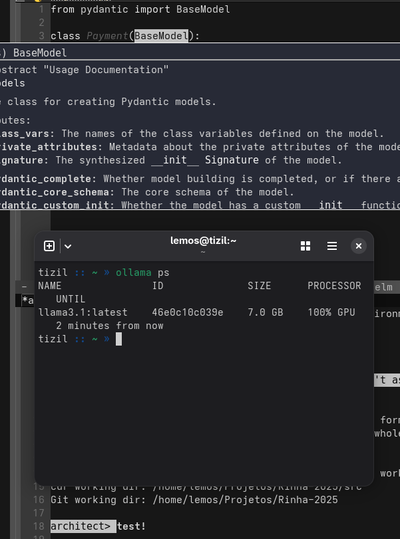
This, combined with the pop-up documentation that appears right when i hover over the BaseModel statement, creates a powerful and comfortable setup.
Example 2: Podman as a Docker Backend
When looking for how to configure Podman on NixOS, you will see this configuration snippet (probably not formatted like the snippet bellow):
  virtualisation = {
       podman = {
          enable = true;
          dockerCompat = true;
       };
If you search for the virtualisation.podman.dockerCompat nixOS option, you will see a link a for a default.nix file, for convenience, it's here.
This simple option implements a lot of configuration that people on other distributions would typically have to do manually to get everything working rootless. Since i'm lazy when it comes to tweak operating systems, i really appreciate the Nix way of doing it, i add a line and a whole complex configuration is done for me based on the file i edited before.
Final example, the swiss army knife for zsh
The earlier Brazilian youtuber mentioned has his shell script for configuring zoxide, oh-my-zsh, specific zsh features, and scripts may differ for each distro. Also, there are aliases to consider, which you would have to set up all over again. Here, i just create the snippet and the zsh is already configured in any machine i want,
       zsh = {
          enable = true;
	  enableCompletion = true;
	  autosuggestion.enable = true;
	  syntaxHighlighting.enable = true;
	  shellAliases = {
	     enterDev = "nix-shell nix/shell.nix";
	     update = "sudo nixos-rebuild switch --upgrade";
	     clean = "sudo nix-collect-garbage -d";
	     cd = "z";
	  };
	  history = {
	      path = "/home/lemos/.zsh/history";
	  };
	  oh-my-zsh = {
	      enable = true;
	      plugins = ["git"];
	      theme = "afowler";
	  };
This snippet can be easily copied and shared with another user on your system, or with a friend who is just starting to configure their Home Manager setup on NixOS
Flakes
Most people enter nix writing everything to a configuration.nix file, this may work for simple setups, but as the config grows, things get gross.
Flakes make all this hassle easier, now your config can be organized as a codebase, keeping .nix files smaller and organized into "domains" that actually make sense. Modules and Inputs from nix-community now can be imported for all machines easily. These modules come with important and handful options, without flakes, these modules are not handled in a single source that "maps" everything and builds based on scope. AI agents can also work with nix, and since you can edit your config as a cloned repo, it's not much of a hassle to edit it like you would do with any codebase, from vscode/cursor/antigravity/kiro, using the agent for stressful tasks, everything circles around a codebase that works like any other one.
You can check my config as an example for the organization of nix files as "domains" and issues.
It's also easier to setup new machines, flakes can handle the disk partitioning, installing the system, and importing configurations from previous setups way easier, you create reusable code within your machines, your home is know a "managed" lab.
Conclusion
Basically, my whole point since the beginning is: NixOS does not require much work to get going (as most people think), yes, there is a learning curve, yes, you do need some time to get used to the "Nix"(tm) way of doing things.
And, if we are to be honest, we need to recognize switching to Linux itself has a learning curve on it's own, and we all undermine how much time we spent with this initial proccess.
All tools have a purpose, scopes and "go"/"no-go" cases, do not ditch something because of a first impression. Think about your needs, which tasks/configurations happen more frequently: Do you add new packages every single day? Do you handle podman/docker with specific configurations? Do you handle complex services that need a lot of tweaking into config files?